
Every deploy gets a code review
The pre-deploy guardrails review travels with your app — a status dot on the card and the full report a click away.
Your app is live. Before it went out, something reviewed it — and the result did not vanish into a terminal scrollback. It travels with the deploy.
The dot on the card
Open the console’s app list and every card carries a small coloured dot beside its name.
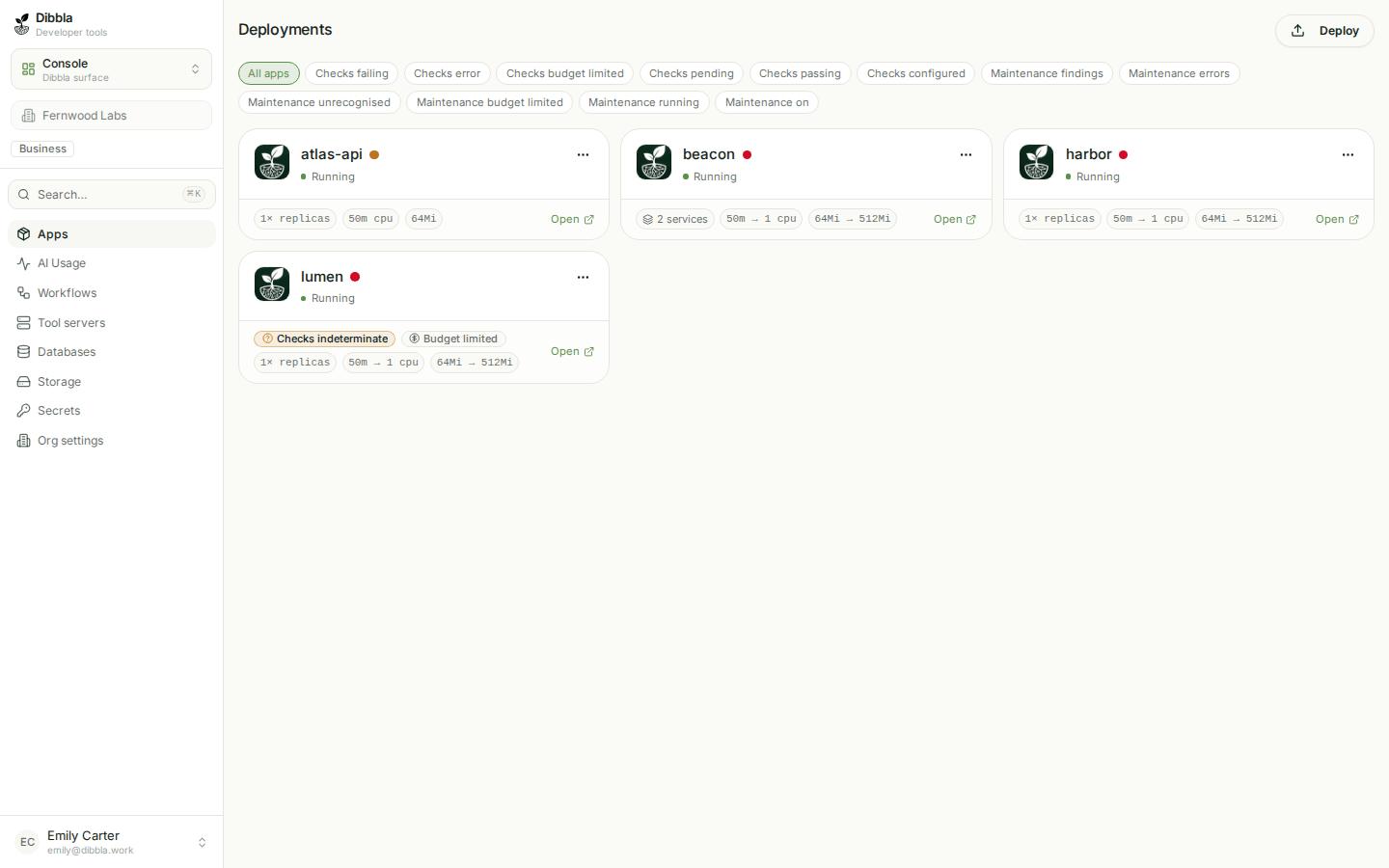
Green means the review passed clean. Amber means it passed with warnings somebody accepted. Red means either critical findings — or no review at all. That last case is the one worth internalising: an app that never had a review looks exactly as alarming as one that failed it. The absence is the finding.
The report behind it
Click the dot.
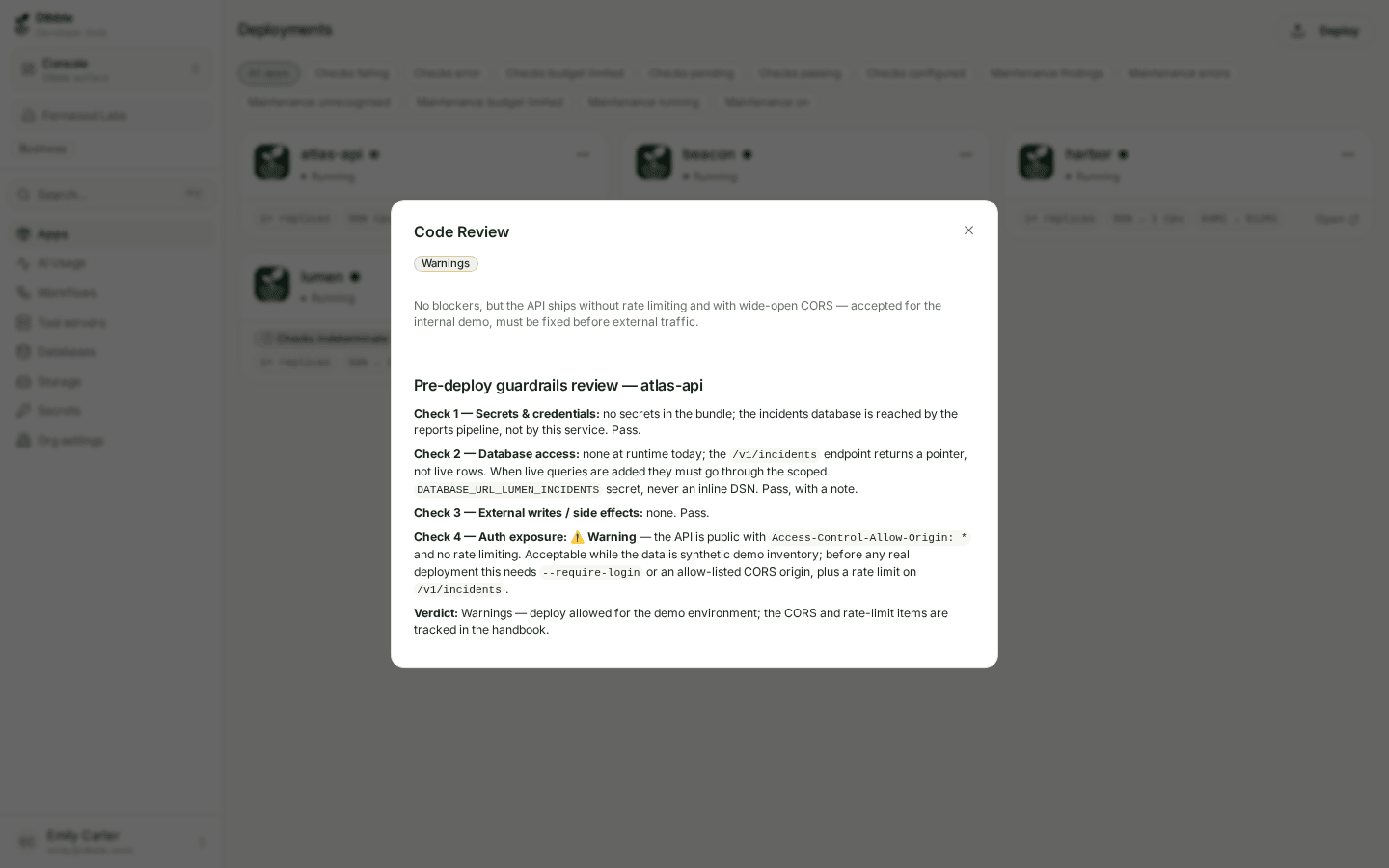
This is the REVIEW.md your deploy carried, rendered. The badge is its
status, the sentence under it is the summary, and the body is the full report:
what was checked, what was found, what was accepted and why.
The review above is a useful shape to copy. It is not a rubber stamp — it records two real risks (an API shipped with open CORS and no rate limiting), says they were accepted deliberately for a demo environment, and names what has to change before real traffic. A reviewer reading it a month later learns something.
Where it comes from
You write it — or your code agent does — as part of the pre-deploy checklist.
It lives at the root of the app, next to the Dockerfile:
---
Review-status: Ok | Warnings | Critical
One-Sentence-Summary: "One line a colleague can read in the app list."
---

## Pre-deploy guardrails report

- [x] Security (OWASP Top 10): OK
- [x] Database usage: ...
- [x] REST / API call patterns: ...
- [x] External system writes: ...
- [x] Personal data (GDPR): ...
The platform reads it out of the deploy archive — after the archive has been
filtered, which REVIEW.md at
the deploy root always survives — parses the frontmatter, and stores it with
the deployment — which is why the console can show it without
asking your repository anything.
A deploy refuses to start if REVIEW.md or the handbook is missing. This is
deliberate: the cheapest moment to notice that an admin UI is public or a
token is hardcoded is before it ships, not after.
It is a client-side check, though. dibbla deploy --skip-review walks
past it, and the server accepts a deploy with no review at all — so the gate
is a habit the CLI enforces for you, not something the platform guarantees
about every deployment in your organisation. If you need the guarantee, you
need a check that does not run on the deployer’s own machine.
Application checks are that missing half — not a
server-side enforcement of REVIEW.md (which says what was reviewed
before shipping), but assertions that run after the deploy, on the
platform, against the running app: the home page answers 200 with the right
text, the JSON carries the field a client depends on. Ship them in a
dibbla-checks.yaml next to this REVIEW.md and dibbla apps checks run
tells you whether the app still does its job — whatever the review said on
the way out the door.
Overnight, the maintenance agent can read those results together with logs and the source that shipped, and open a change that a different person still has to approve. It does not replace this review, and it does not deploy on its own.
Have a code agent run the review and write the file, before you deploy.
Run the Dibbla pre-deploy guardrails checklist against this project and write
REVIEW.md at the root. Check security, database usage, REST call patterns,
external writes and personal data — list which fields are personal data, how a
person is deleted and which third parties receive them. If you find something
that should be fixed rather than accepted, tell me before writing the file.
What to do with a red dot
Open it and read. A red dot with “No review” means the last deploy skipped the step — redeploy with a review. A red dot with findings means someone shipped knowing there were blockers; the report says which.
# after writing REVIEW.md
$dibbla deploy . --alias my-first-app -m "chore: attach the pre-deploy review" --update