
Give your app AI
Point any OpenAI- or Anthropic-compatible client at the gateway, authenticate with your Dibbla token, and read every call back in the ledger.
The gateway’s whole proposition fits in one sentence: your Dibbla token is the model key. Point a client at the gateway, put your Dibbla token where the provider key would go, and the platform swaps in its own on the way out.
Nobody on your team ever holds an OpenAI or Anthropic key, and every call is attributed to your organisation.
From a deployed app
Your app needs two things: the gateway’s URL, and a Dibbla token to
authenticate with. The platform gives every deployed app the URL as
DIBBLA_AI_GATEWAY_URL. The token is yours to set, as a secret, before you
write any code:
# paste a Dibbla API token, minted in the portal under API keys, when asked
$dibbla secrets set DIBBLA_API_TOKEN -d my-app

# or have it typed on a Dibbla page — what an AI assistant runs
$dibbla secrets request DIBBLA_API_TOKEN -d my-app --title "Dibbla API token"
Every deployment — a single Dockerfile, which is what
your first deploy produces, as much as a dibbla.yaml
manifest — receives DIBBLA_AI_GATEWAY_URL and DIBBLA_ALIAS. It never
receives DIBBLA_API_TOKEN: nothing would be safe about handing every
container a credential for the whole organisation.
Two endpoints are exposed, so you keep using whichever SDK you already know:
import os
from openai import OpenAI

client = OpenAI(
  base_url=os.environ["DIBBLA_AI_GATEWAY_URL"] + "/openai/v1",
  api_key=os.environ["DIBBLA_API_TOKEN"],   # your Dibbla token
)
client.chat.completions.create(model="gpt-5-mini", messages=[...])
import os
from anthropic import Anthropic
client = Anthropic(
base_url=os.environ["DIBBLA_AI_GATEWAY_URL"] + "/anthropic",
api_key=os.environ["DIBBLA_API_TOKEN"], # your Dibbla token
)
client.messages.create(model="claude-haiku-4-5", max_tokens=200, messages=[...])Which providers and models are on offer, and where each one processes your calls — including EU-only Berget AI — is on Models & providers.
Send the X-Dibbla-App header — your DIBBLA_ALIAS — and the call is
recorded against that app. Send the variable as it is: it is the full
deployment name in the app’s address (my-app-0ee1f995), and the shorter
name you deployed with (my-app) is not recognised. Without the header, or
with a name the gateway does not recognise, the call still works; it is
simply recorded as coming from outside.
From your laptop
The same gateway backs your own tools. dibbla ai env prints the exports for
Claude Code, Cursor or opencode:
$dibbla ai url
$eval $(dibbla ai env)
$dibbla ai test
The ledger
Every call lands in a ledger you can read, live.
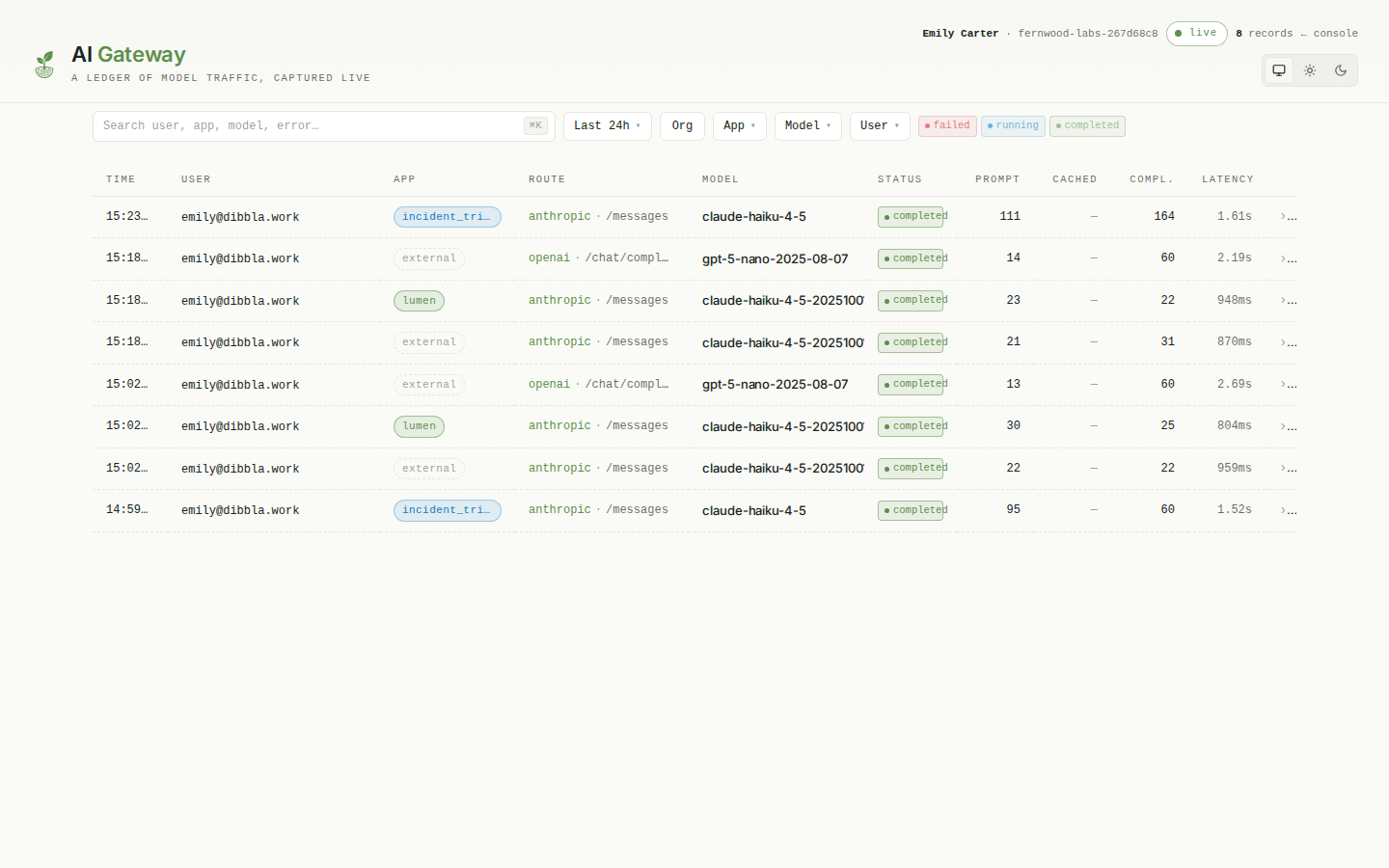
Time, user, app, route, model, prompt and completion tokens, latency, status. Calls made by a deployed app carry its alias; calls from a laptop tool show as external. The maintenance agent and application checks appear under the app they ran on, labelled as such. When Dibbla Care pays for them they are marked Included in Dibbla Care and kept out of your totals. Clicking a row opens the full trace.
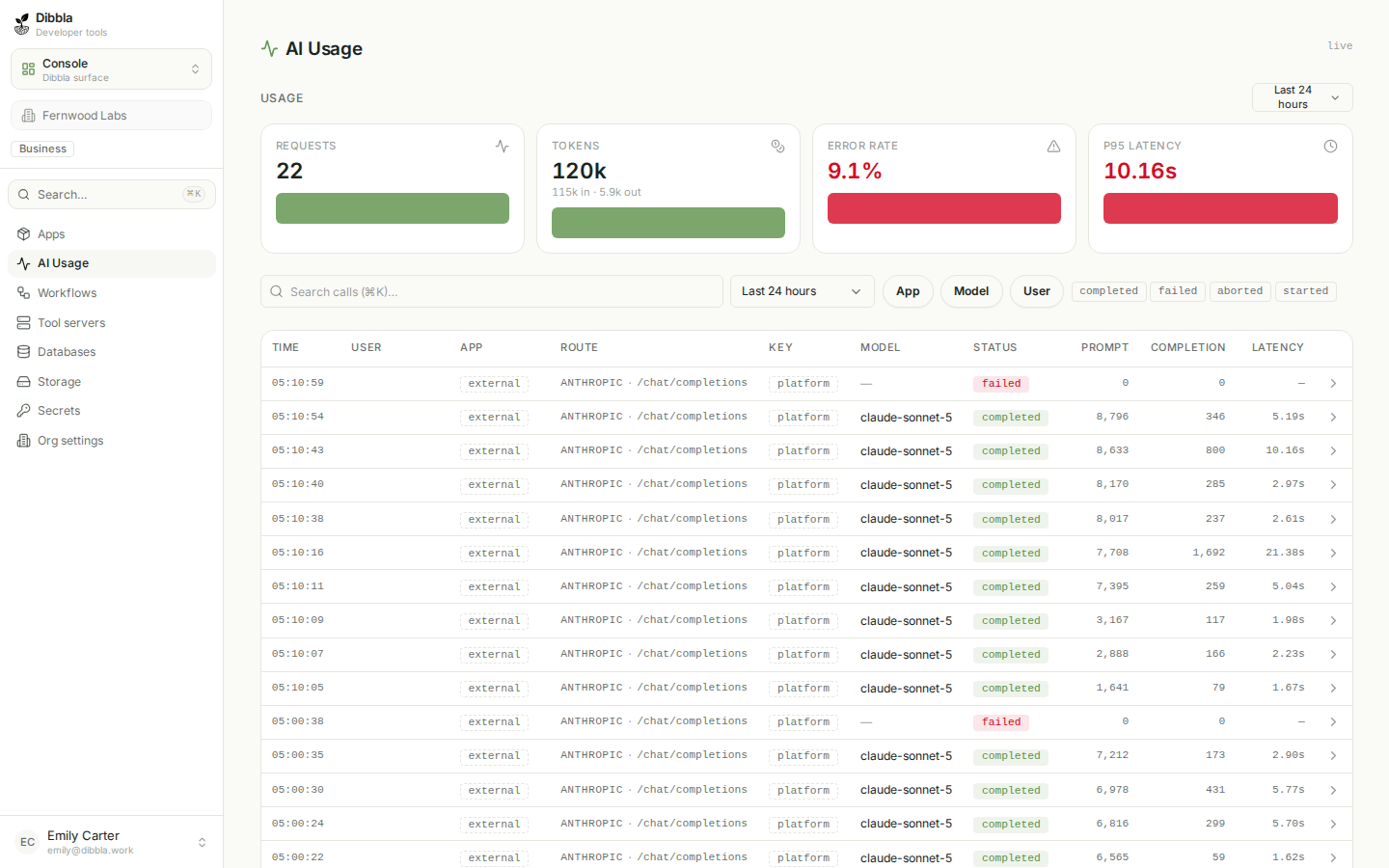
The console shows the same data aggregated, which is the view you want when the question is about spend rather than about one request:
Bring your own provider key
By default the platform’s key signs your calls and the spend lands on your Dibbla bill. An organisation admin can instead store the organisation’s own OpenAI or Anthropic key under Organization settings → AI, on the Provider API keys card. From then on that key signs all of the organisation’s gateway traffic — deployed apps included — so the provider bill follows the key. Nothing else changes: the same URL, the same Dibbla token, the same ledger. The key is validated against the provider before it is saved, stored encrypted, and never returned to the browser afterwards.
Anthropic keys and the workspace id
Every key you can create in the Claude Console today is identity-linked — tied to a person or a service account rather than to a workspace. If the key was not created scoped to one specific workspace, Anthropic requires each call to name a workspace, and rejects it otherwise:
anthropic-workspace-id is required when authenticating with an identity-linked API key
Paste that workspace id into the optional Workspace ID field next to the
key. Open the workspace in the Claude Console and copy the wrkspc_… id from
the address bar. It is stored and shown in the clear — it identifies a
workspace, it does not authenticate to one — and travels with the key: rotate
onto a workspace-scoped key and clear the field, and nothing stale is left
behind. Leave it empty for a workspace-scoped key, and for OpenAI, which has
no such concept.
Provider keys spread. One gets pasted into a laptop, another into a CI variable, and eighteen months later nobody can say which app is spending what — or rotate a key without breaking something unknown. Here there is one credential per person or app, it is already rotatable, and attribution is a property of the system rather than a convention people follow.